Billr — Freelance Invoice & Payment Tracker
A mobile app that lets Indian freelancers create invoices in seconds, track payment status in real time, and send one-tap reminders to clients via WhatsApp or email.
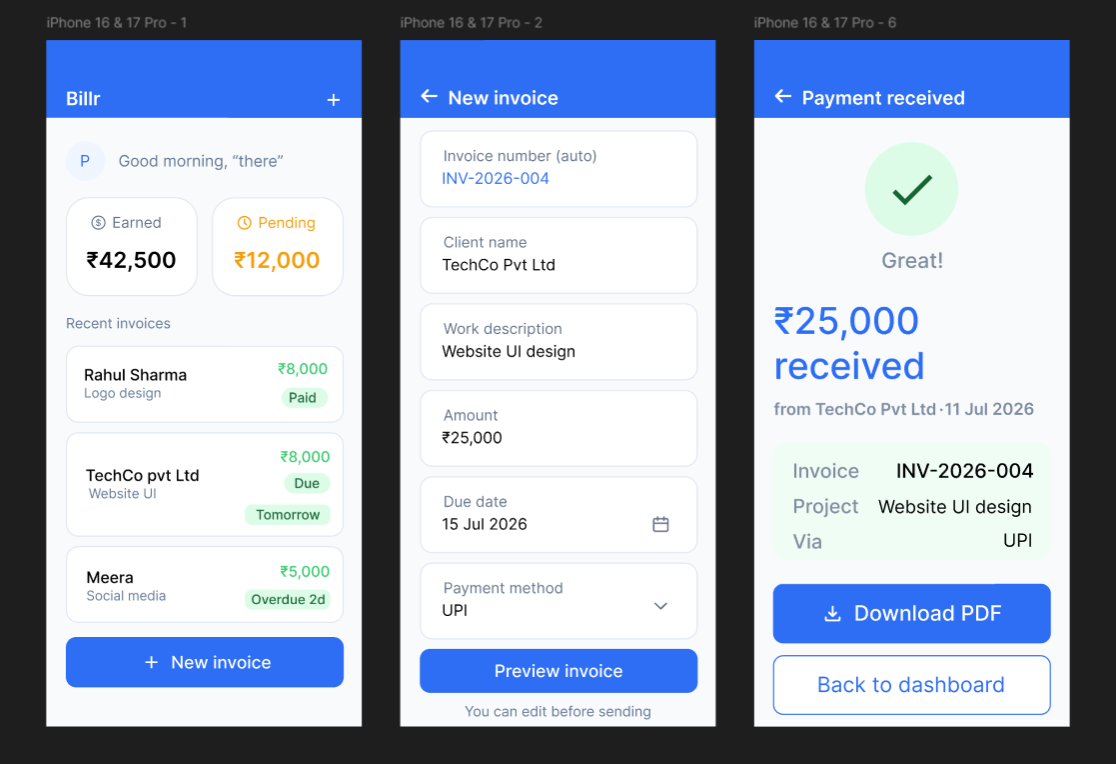
Overview
Freelancers in India have no simple tool to create invoices, track payments, and follow up with clients. Most send PDF invoices over WhatsApp and track pending payments in notebooks or Excel sheets. I designed Billr end-to-end in Figma based on exploratory interviews with freelancers in my own network.
Problem
Millions of Indian freelancers — designers, writers, developers, tutors — work without any structured payment system. Existing tools like Zoho or QuickBooks are built for businesses, not solo freelancers: complex, expensive, and overwhelming for someone who just wants to know "has my client paid yet?"
Pain points that came up again and again:
- Freelancers manually type invoice details every time.
- No way to know if a client has opened the invoice.
- Following up is awkward and manual.
- No single view of total earned vs. pending.
Problem statement: Indian freelancers have no simple, affordable tool to create invoices, track payment status, and follow up with clients — leading to delayed payments, lost records, and awkward money conversations.
Research
A small, exploratory round — not a formal study. I spoke with 4 people in my network who freelance (design, content writing, tutoring, photography) about how they currently invoice, how they track payment, and what's most frustrating about getting paid.
Findings:
- All 4 used WhatsApp to send PDF / image invoices — no formal tool.
- "Chasing clients" was the #1 frustration.
- No one tracked invoices systematically (Notes app or notebook).
- Existing apps felt "too corporate" — Zoho, QuickBooks seen as overkill.
- UPI is the preferred payment method; everyone wanted it auto-included.
I'm upfront that a sample of 4 can surface directional themes but can't confirm how common these pain points are across the wider freelancer population — see "What I'd Test Next."
Define
Persona · Priya, 23
Freelance UI Designer
Takes 3–5 projects/month from different clients, earns ₹30,000–₹60,000/month but struggles to track what's paid. Sends invoices as Canva PDFs over WhatsApp and follows up with an awkward "Hi, just checking…" message.
"I never know if my client has seen the invoice or is just ignoring it."
Design goal: make invoicing and payment tracking feel as simple as sending a WhatsApp message.
Ideate
Design principles: everything in 3 taps or less; WhatsApp-first (reminders go where clients already are); status visibility (always show paid / pending / overdue clearly with color); India-first (₹, UPI).
I considered three directions:
- A — List-based tracker only, no creation. Rejected: adds a duplicate-entry step rather than removing one.
- B — Full invoice creation + tracking + reminders in one app.
- C — WhatsApp bot for invoice creation via chat.Matches where freelancers already live, but made a clear "status at a glance" view hard to design.
I chose Direction B — the only one solving all three research findings at once: removes duplicate entry, keeps WhatsApp as the reminder channel, and still gives a dedicated status-at-a-glance view.
Scoped to 6 core screens covering the full loop from "no invoices" to "payment received." A dedicated Payment Tracker screen with filter tabs was deprioritized since the Dashboard already covers status at a glance — moved to "What I'd Design Next."
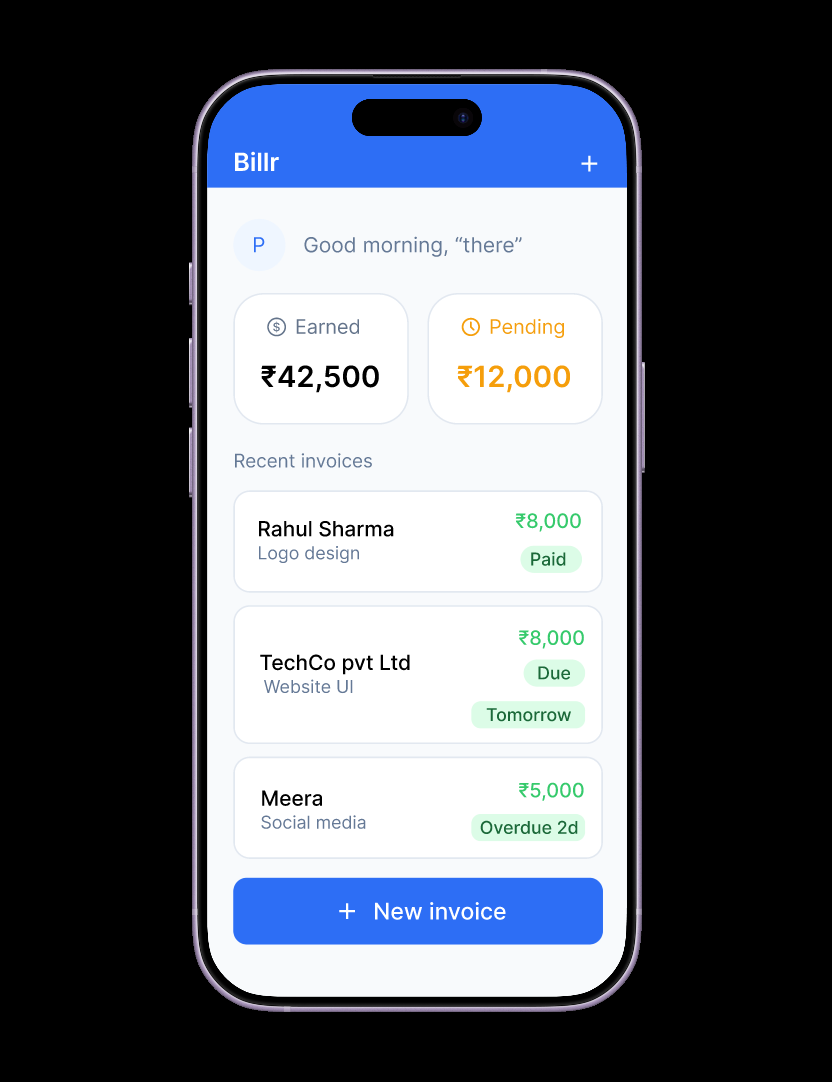
Dashboard
Personalized greeting, two stat cards (Total earned this month / Total pending), recent invoices list with status badges (Paid/Due/Overdue), and a persistent "New invoice" button. Answering "how much have I made, how much am I still owed" in 2 seconds was the #1 goal.
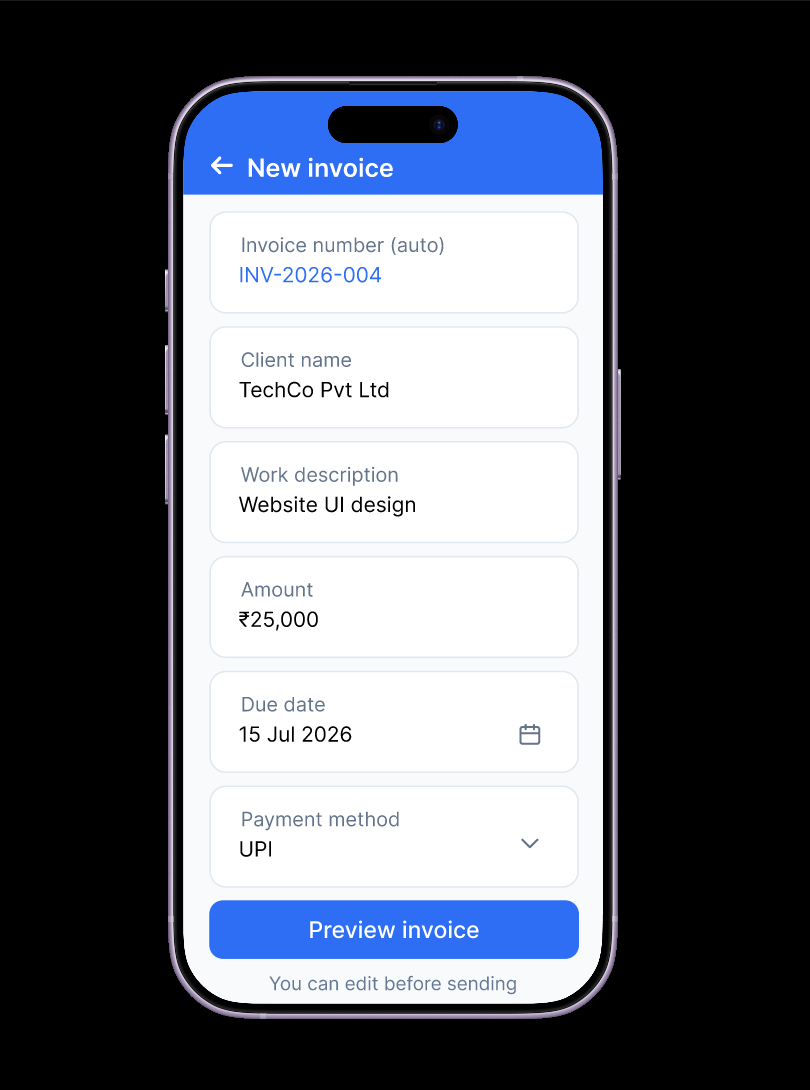
New Invoice
Auto-generated invoice number, single-column form for client, work, amount, due date, and payment method — with large tap targets and a single CTA "Preview invoice." Scoped to essential fields only; design target: zero to sent in under 60 seconds.
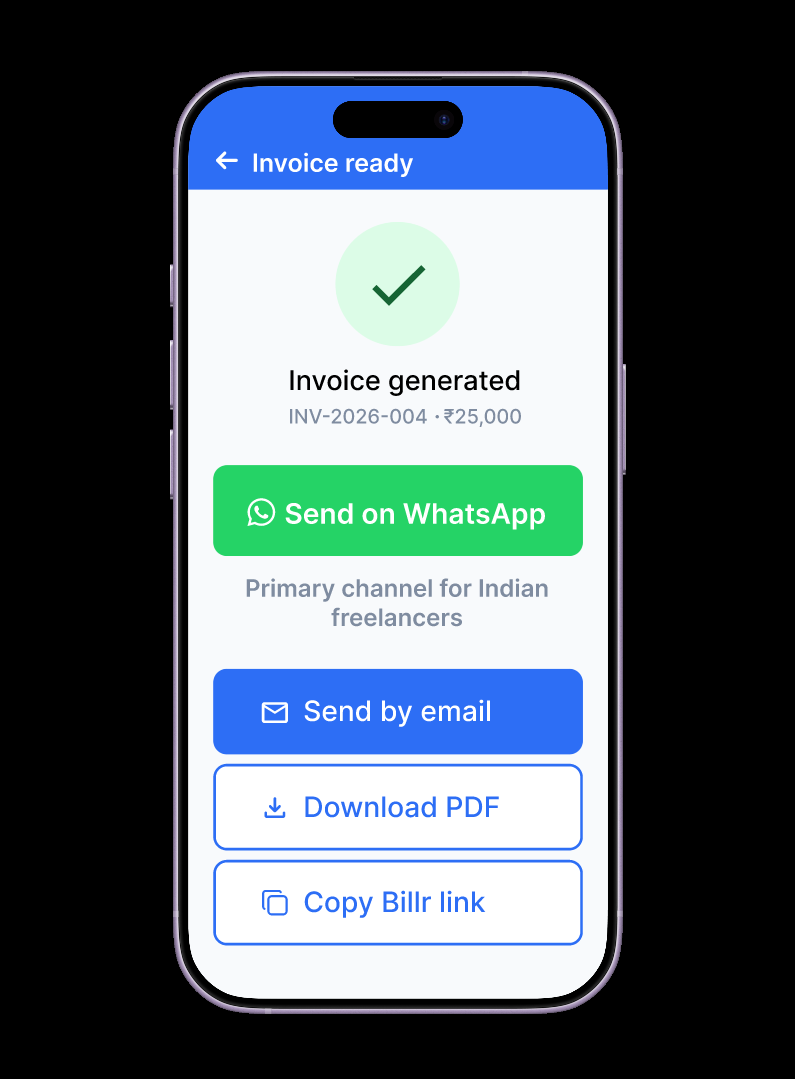
Invoice Ready
Confirms the invoice is generated with ID and amount. "Send on WhatsApp" is the primary highlighted action — green, matching the dominant channel. Email, PDF, and copy link are available as secondary options.
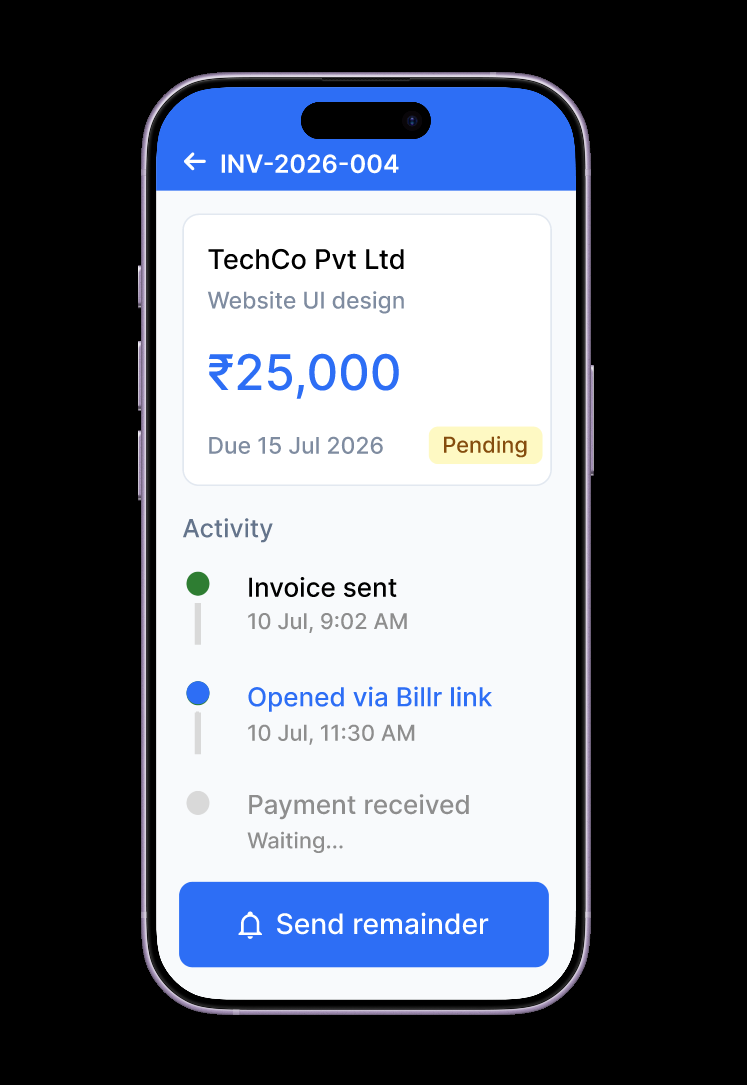
Invoice Detail + Activity Tracker
Summary card plus an activity timeline: Invoice sent → Opened via Billr link → Payment received. "Send reminder" as the primary action. "Opened via Billr link" directly answers the #1 research pain point: freelancers never know if clients have seen the invoice.
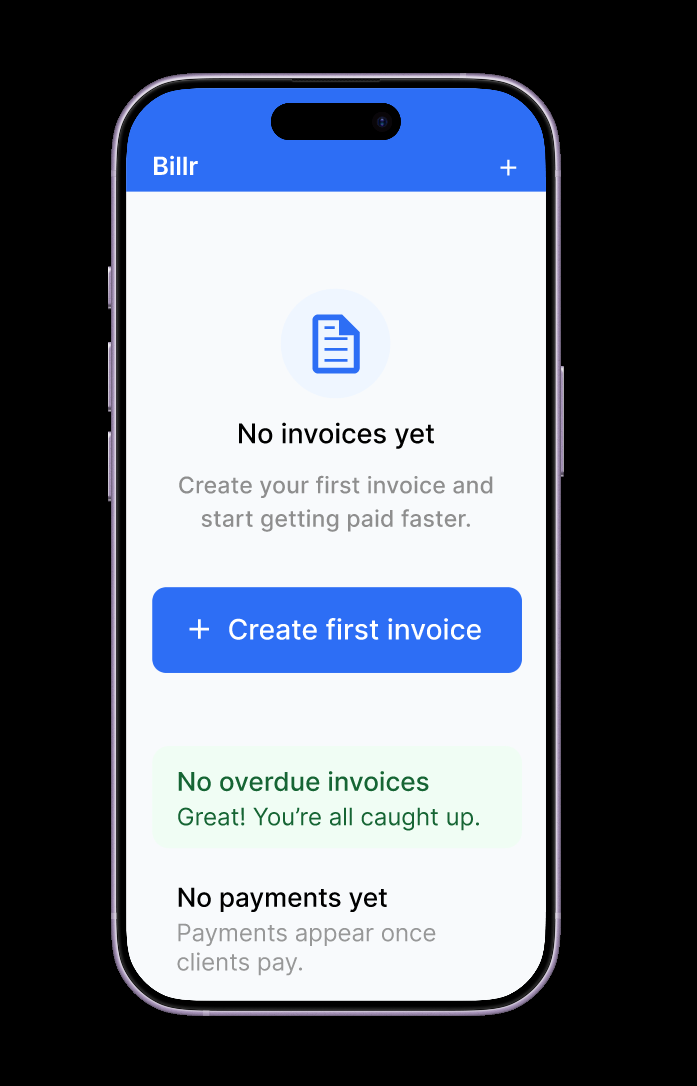
Empty States
A friendly illustration and "No invoices yet" with the primary CTA "Create first invoice." Distinct reassuring copy for "no overdue" and "no payments yet" states — never one generic empty message.
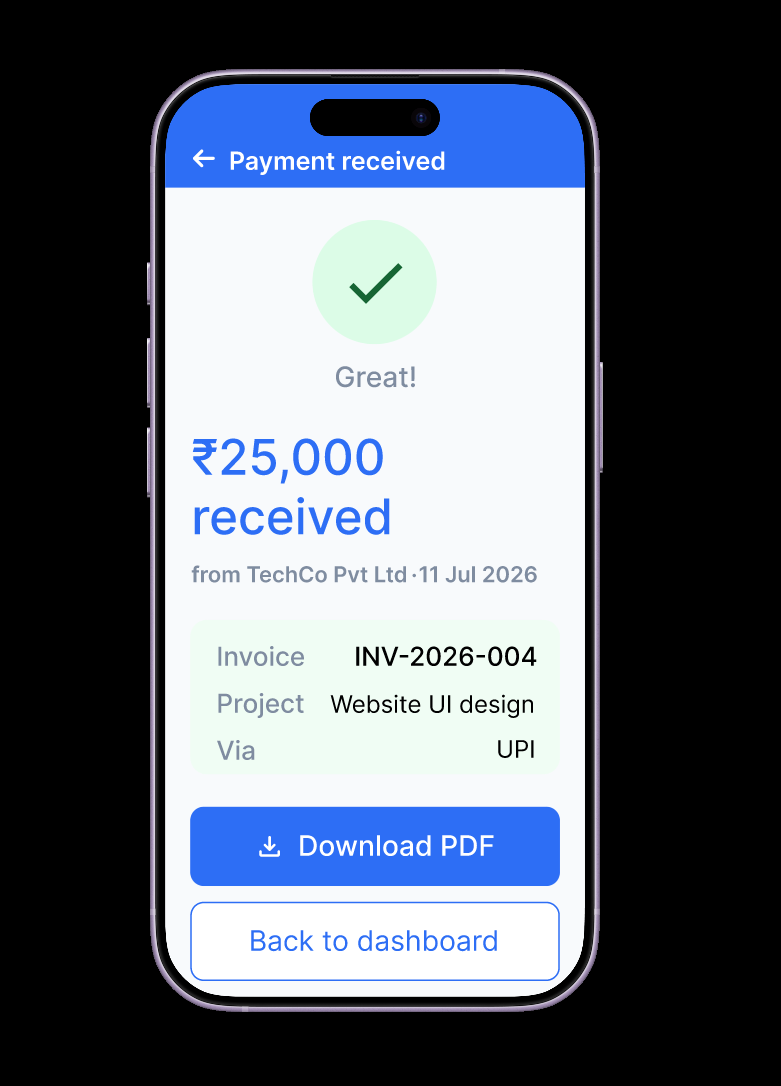
Payment Received
Confirmation checkmark and amount received, client name and date, invoice reference, project name, and UPI payment method. Download PDF and Back to dashboard actions. One-tap reminders are triggered from the invoice detail screen — no separate tone templates in v1.
| Task | Before | After (Billr) |
|---|---|---|
| Creating an invoice | Canva / Word → export PDF → WhatsApp | Fill 5 fields → auto-numbered invoice → send |
| Knowing if client saw it | No way to know | "Opened via Billr link" status |
| Tracking payments | Notebook / mental memory | Dashboard stat cards + status badges |
| Following up | Awkward manual WhatsApp message | One-tap "Send reminder" |
| Seeing total earnings | Calculate manually in Excel | Dashboard stat cards |
| Getting paid | No confirmation beyond bank app | Dedicated Payment Received screen |
Note: "After" reflects intended experience — not yet usability-tested.
What I'd Design Next
- Payment Tracker screen with filter tabs (All / Paid / Pending / Overdue) and color-coded amounts — deprioritized in v1 since Dashboard covers small invoice counts; would need text/icon backup for colorblind accessibility.
- Send Reminder as its own screen — a dedicated preview of the WhatsApp message before sending, with room to edit.
What I'd Test Next
- Usability testing with 4–5 freelancers outside my original research group on the New Invoice and reminder flows.
- Test whether "Opened via Billr link" actually changes follow-up behavior or increases anxiety.
- Test the reminder message copy tone.
- Test whether 5 form fields is right, or some need more (GST number, project code).
- Expand research beyond the initial 4 contacts to a more varied group.
Success metric: time from "decide to send invoice" to "invoice sent" — target under 60 seconds (currently a design target, not a tested result).
Learnings
Constraints were helpful — deciding early that Billr was only for solo Indian freelancers made every decision easier (₹, WhatsApp-first, simplicity). The emotional problem (awkwardness of following up) mattered as much as the functional one (no tracking tool). Without usability testing or a larger sample, I've designed a strong hypothesis, not a validated solution — and being able to say that clearly is itself part of doing good UX work.